

Documentation Index
Fetch the complete documentation index at: https://docs.evo-ai.co/llms.txt
Use this file to discover all available pages before exploring further.
Overview
The Loop Agent is a type of workflow agent that executes sub-agents in an iterative cycle until a stop condition is met. This pattern is ideal for processes that need continuous refinement, iterative improvement, or multiple attempts until achieving a satisfactory result. Unlike Sequential and Parallel agents, the Loop Agent repeats the execution of sub-agents multiple times, allowing each iteration to improve the result based on feedback from the previous iteration.Based on Google ADK: Implementation following the patterns of the Google Agent Development Kit for iterative agents.
Key Features
Iterative Execution
Repeats sub-agent execution until stop condition is met
Continuous Improvement
Each iteration can improve the result based on the previous one
exit_loop Tool
Stop control via automatic tool in instructions
Full Flexibility
Customizable stop criteria via instructions
exit_loop Tool - Stop Control
Important: The Loop Agent allows you to select which sub-agents can use the
exit_loop tool. During sub-agent configuration, you define which ones have the power to stop the loop.- In each sub-agent configuration, you can enable the use of the
exit_looptool - Only selected sub-agents can decide to stop the loop
- The tool accepts parameters to document the reason for stopping
- Allows granular control over who can finalize the iterative process
- ✅ Sub-agents with exit_loop: Can use the tool to stop the loop
- ❌ Sub-agents without exit_loop: Execute normally without stopping power
exit_loop function accepts no arguments. It simply signals that the loop should stop.
Output Keys - State Sharing
Final Response: The sub-agent that has the Output Key defined as
loop_output will be used to generate the final response presented to the user at the end of the loop.- LLM Agent: Saves language model response
- Task Agent: Saves task execution result
- Workflow Agent: Saves executed workflow result
- A2A Agent: Saves Agent-to-Agent protocol response
loop_output:
- ⭐
loop_output- Sub-agent that generates final response presented to user - This agent is executed after all iterations to consolidate result
- This agent’s response is presented to the user as the final result
- Only one sub-agent can have
loop_outputas output_key
- Configure the Output Key of each sub-agent
- The result is automatically saved in the loop state
- Use placeholders
{{output_key_name}}in instructions to access data - State persists across all loop iterations
- At the end, the agent with
loop_outputconsolidates the final response
When to Use Loop Agent
Ideal Scenarios
Ideal Scenarios
✅ Use Loop Agent when:
- Iterative refinement: Improve result with each attempt
- Optimization: Seek best solution through iterations
- Validation with retry: Try until achieving valid result
- Incremental learning: Improve based on feedback
- Convergence: Iterate until reaching quality criteria
- Content refinement until desired quality is achieved
- Parameter optimization through trials
- Code generation with iterative corrections
- Multi-round negotiation
- Analysis with feedback-based refinement
When NOT to use
When NOT to use
❌ Avoid Loop Agent when:
- Single result: Process only needs to execute once
- No possible improvement: Iterations don’t add value
- Limited resources: Multiple executions are too costly
- Time critical: No time for multiple attempts
- Deterministic: Result will always be the same
Creating a Loop Agent
Step-by-Step on the Platform
1. Start creation
1. Start creation
- On the Evo AI main screen, click “New Agent”
- In the “Type” field, select “Loop Agent”
- You’ll see specific fields for loop configuration

2. Configure basic information
2. Configure basic information
Name: Descriptive name for the loop agentDescription: Summary of the iterative processGoal: Objective of the iterative process
3. Configure loop sub-agents
3. Configure loop sub-agents
Sub-Agents: Add agents that will execute in each iteration💡 Important: Sub-agent order defines sequence within each iteration🛑 Stop Control: For each sub-agent, you can enable the use of 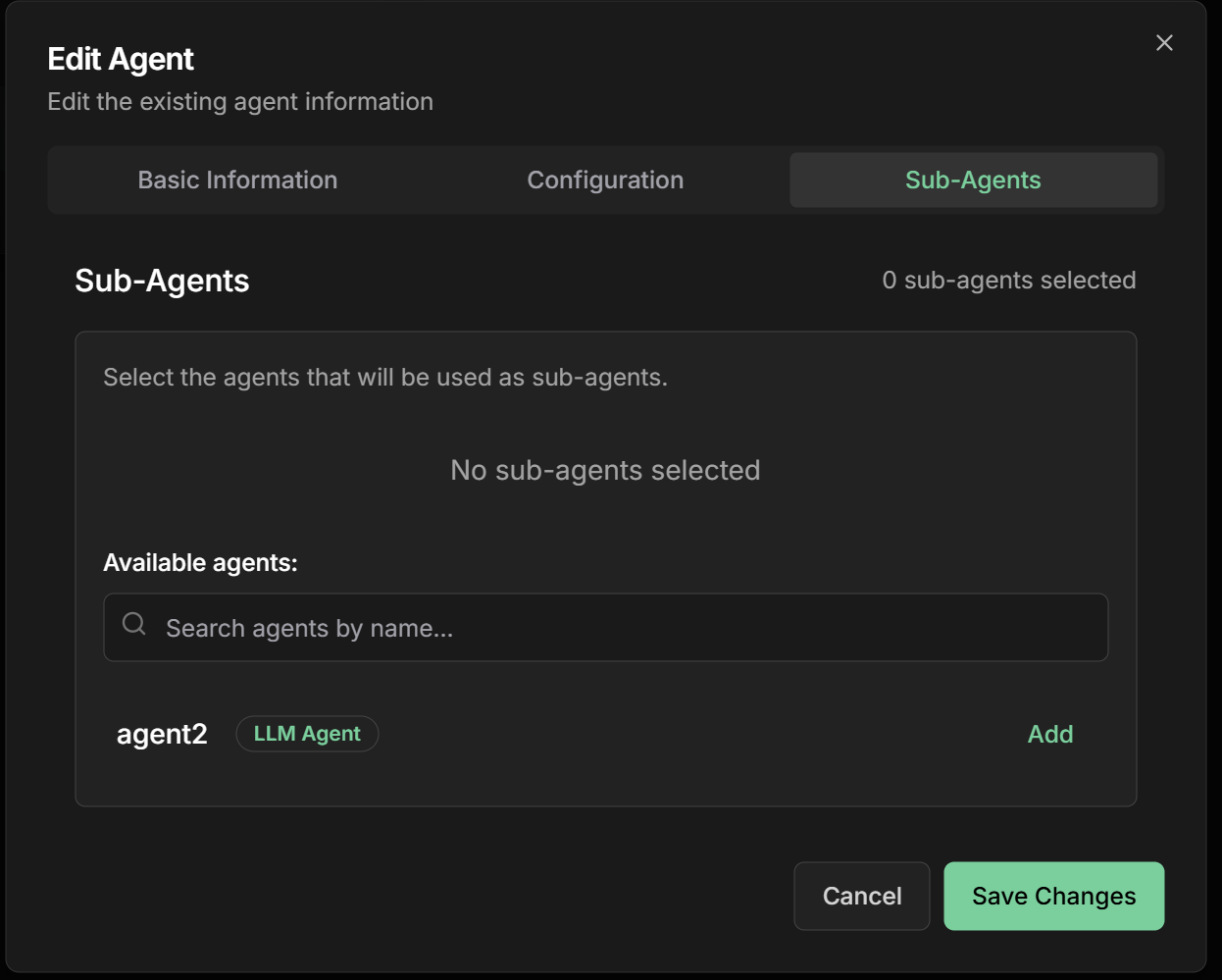
exit_loop tool🎯 Final Response: One sub-agent must have output_key: "loop_output" to generate final responseContent refinement example:- Content Generator - Creates or refines content
- Quality Analyzer - Evaluates content quality
- Feedback Collector - Identifies improvement points
- Criteria Checker - Decides whether to continue (🛑 can use exit_loop)
- Finalizer - Generates final response (🎯 output_key: “loop_output”)
4. Define coordination instructions
4. Define coordination instructions
Instructions: How the agent should coordinate iterationsexit_loop()
5. Configure sub-agent Output Keys
5. Configure sub-agent Output Keys
Output Key: Field available for all agent typesAgent types that support output_key:Usage in instructions:
- ✅ LLM Agent - Saves model response to state
- ✅ Task Agent - Saves task result to state
- ✅ Workflow Agent - Saves workflow result to state
- ✅ A2A Agent - Saves A2A protocol response to state
- ⭐
loop_output- Sub-agent that generates final response presented to user
6. Configure loop stop control
6. Configure loop stop control
Control via How it works:Example stop instruction:
exit_loop Tool:During sub-agent configuration, you select which ones can use the exit_loop tool. Only enabled sub-agents have the power to stop the loop.Configuration in interface:Practical Examples
1. Marketing Content Refinement
Loop Structure
Loop Structure
Objective: Refine content until achieving high quality and effectivenessSub-Agents in each iteration:1. Content Generator
- Name:
content_generator - Description:
Generates or refines content based on feedback - Instructions:
- Output Key:
current_content
- Name:
quality_analyzer - Description:
Evaluates content quality across multiple dimensions - Instructions:
- Output Key:
quality_analysis
- Name:
feedback_collector - Description:
Identifies specific improvements based on analysis - Instructions:
- Output Key:
improvement_feedback
- Name:
criteria_checker - Description:
Decides whether to continue iterating or use exit_loop - ✅ Can use exit_loop: Enabled
- Instructions:
- Output Key:
stop_decision
- Name:
final_consolidator - Description:
Generates consolidated final response for user - ✅ Can use exit_loop: Disabled (executes after loop)
- Instructions:
- Output Key:
loop_output⭐
2. Optimization with Different Agent Types
Loop Structure
Loop Structure
Objective: Optimize parameters using different agent typesSub-Agents in each iteration:1. Parameter Adjuster (LLM Agent)
- Type:
LLM Agent - Description: Adjusts parameters based on previous performance
- Instructions:
Analyze request {{user_input}} and previous performance: {{previous_performance}}. Adjust parameters to improve results. - Output Key:
current_parameters
- Type:
Task Agent - Description: Executes simulation with new parameters
- Task: Campaign simulation with parameters in
{{current_parameters}} - Output Key:
simulated_performance
- Type:
A2A Agent - Description: Analyzes data via external protocol
- Endpoint: Analysis system that receives
{{simulated_performance}} - Output Key:
detailed_analysis
- Type:
LLM Agent - Description: Decides if satisfactory optimization achieved
- ✅ Can use exit_loop: Enabled
- Instructions:
Based on analysis {{detailed_analysis}}, if improvement < 5% use exit_loop. - Output Key:
optimization_decision
- Type:
LLM Agent - Description: Generates final response with optimized parameters
- ✅ Can use exit_loop: Disabled
- Instructions:
Based on complete optimization {{current_parameters}} and {{detailed_analysis}}, present final result for {{user_input}}. - Output Key:
loop_output⭐
3. Development with Workflow Agents
Loop Structure
Loop Structure
Objective: Develop code using complex workflowsSub-Agents in each iteration:1. Code Generator (LLM Agent)
- Type:
LLM Agent - Description: Generates or fixes code based on requirements
- Instructions:
Based on request {{user_input}}, generate code for: {{requirements}}. If there are errors in {{test_results}}, fix them. - Output Key:
current_code
- Type:
Workflow Agent(Sequential) - Description: Executes complete testing pipeline
- Sub-agents: [syntax_validator, test_executor, coverage_analyzer]
- Output Key:
test_results
- Type:
A2A Agent - Description: Analyzes quality via external system
- Endpoint: Code analysis system that receives
{{current_code}} - Output Key:
quality_analysis
- Type:
LLM Agent - Description: Decides if code is ready
- ✅ Can use exit_loop: Enabled
- Instructions:
Analyze results {{test_results}} and quality {{quality_analysis}}. If all tests passed and quality >= 8, use exit_loop. - Output Key:
final_check
- Type:
LLM Agent - Description: Delivers final code to user
- ✅ Can use exit_loop: Disabled
- Instructions:
Present final code {{current_code}} with documentation based on {{test_results}} and {{quality_analysis}} for {{user_input}}. - Output Key:
loop_output⭐
Advanced Loop Configurations
Output Keys - Shared State
Output Key Configuration
Output Key Configuration
Output Key is available for all agent types:LLM Agent:Task Agent:Workflow Agent:A2A Agent:
Data Flow Between Agents
Data Flow Between Agents
How data flows in the loop:Automatic placeholders:
- Use
{{code}}to access previous agent result - Use
{{tests}}to access test results - Use
{{requirements}}to access initial data - All data persists between iterations
Output Keys Best Practices
Output Keys Best Practices
Naming:
- Use snake_case:
analysis_result,processed_data - Be descriptive:
quality_feedbackinstead offeedback - Avoid conflicts: don’t use names already existing in state
- Keep data structured when possible
- Use JSON for complex data
- Document expected format in instructions
- Avoid saving unnecessarily large data
- Clean temporary data when no longer needed
- Use output_key only when data will be reused
Stop Control with exit_loop
How to use exit_loop tool
How to use exit_loop tool
The exit_loop tool is automatically made available to the agent and should be used in instructions to control when to stop the loop.1. Score-based Stop:2. Improvement-based Stop:3. Criteria-based Stop:4. Custom Condition:
Time Control
Time Control
Timeouts by level:Iteration Timeout: Time limit per iterationTotal Loop Timeout: Total loop time limitSub-Agent Timeout: Time limit per sub-agent
Convergence Monitoring
Convergence Monitoring
Convergence metrics:Progress Tracking:Trend Analysis:
- Detects improvement trends
- Identifies performance plateaus
- Predicts required number of iterations
- Suggests parameter adjustments
Optimization Strategies
Loop Performance
Loop Performance
Speed optimizations:Smart Cache:Early Termination:Adaptive Timeouts:
Memory Management
Memory Management
State control between iterations:State Management:Memory Limits:Data Persistence:
Monitoring and Debugging
Tracking Iterations
Loop Dashboard
Loop Dashboard
Real-time visualization:
Loop Debugging
Loop Debugging
Common problems:1. Infinite Loop2. Slow Convergence3. Quality Regression4. Frequent Timeout
Best Practices
Effective Loop Design
Effective Loop Design
Fundamental principles:
- Quality feedback: Each iteration should provide specific and actionable feedback
- Clear criteria with exit_loop: Define in instructions when to use exit_loop
- Multiple stop conditions: Implement various conditions with exit_loop
- Progress monitoring: Track improvement metrics
- Regression validation: Prevent iterations from worsening result
- Stop documentation: Use reason parameter to explain why it stopped
Convergence Optimization
Convergence Optimization
Strategies for fast convergence:
- Incremental feedback: Focus on one improvement at a time
- Prioritization: Address most impactful problems first
- Adaptive learning: Adjust strategy based on progress
- Early stopping: Stop when marginal improvement is low
- Quality gates: Validate minimum quality each iteration
Robustness and Reliability
Robustness and Reliability
Ensuring stable execution:
- Error handling: Handle sub-agent failures gracefully
- State persistence: Save state between iterations
- Recovery mechanisms: Allow restart from failure points
- Resource management: Monitor CPU, memory and time usage
- Circuit breakers: Prevent failure cascades
Common Use Cases
Content Creation
Iterative Refinement:
- Text improvement until desired quality
- Copy optimization for conversion
- Commercial proposal refinement
Optimization
Optimal Parameter Search:
- Marketing campaign tuning
- Price optimization
- System configuration adjustment
Development
Generation and Correction:
- Code generation with iterative testing
- Algorithm refinement
- Automatic bug fixing
Negotiation
Iterative Processes:
- Automatic contract negotiation
- Proposal refinement
- Commercial terms optimization
Next Steps
Sequential Agent
Learn about ordered sequential execution
Parallel Agent
Explore parallel sub-agent execution
LLM Agent
Return to intelligent agent fundamentals
Configurations
Explore advanced agent configurations
The Loop Agent is perfect for processes that need continuous refinement and iterative improvement. Use it when you want to achieve high quality through multiple attempts and constant feedback.